

Table of Contents
ToggleWhy I Use Track Titan for My Racing Progress.
Since the release of F1 24, I’ve been using Track Titan to understand and improve my driving.
But it’s with F1 25 that I’ve made my biggest leaps — and as a console racer on PS5, I’ve been amazed at how much I can still learn through this platform.
What started as curiosity soon became a core part of my racing setup. Track Titan gave me the confidence to turn off all assists, and I now feel more in control of every lap than ever before.
What Makes Track Titan So Powerful.
Track Titan isn’t just another overlay tool — it’s your personal driving coach.
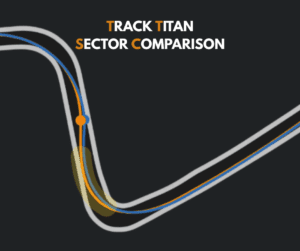
It analyses your laps and shows exactly where you’re gaining or losing time, comparing throttle, brake, and gear inputs in precise detail.
Favourite Features I Use Every Session:
- Throttle, brake, and gear analysis: see exactly where your inputs differ from the optimal lap.
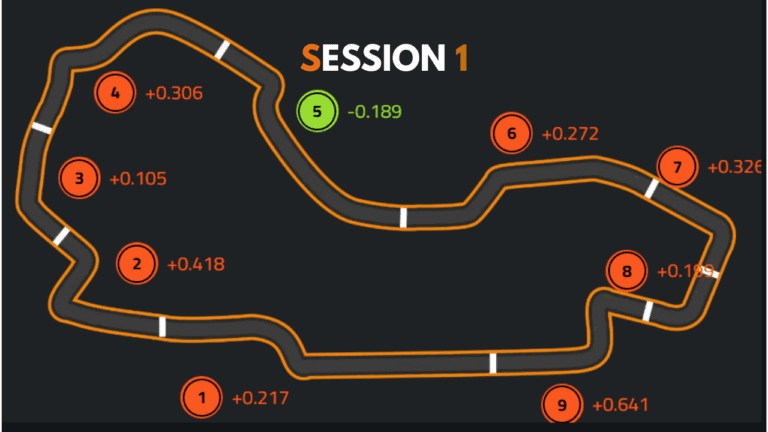
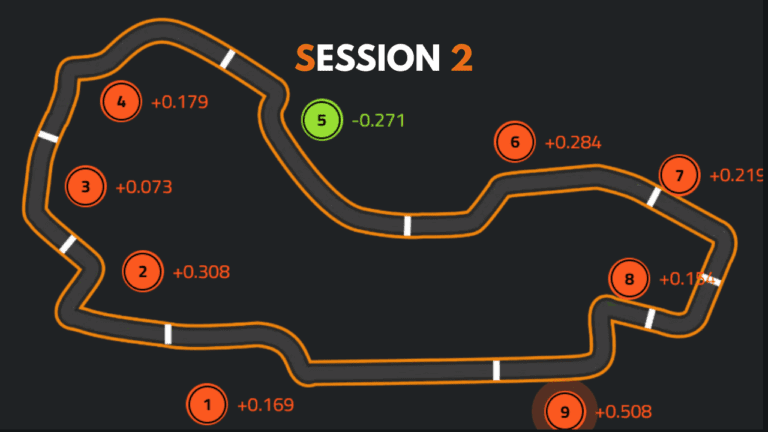
- Lap delta visualisation: easily spot which corners cost you the most time.
- AI-driven driver tips: get step-by-step advice for each phase of a corner — entry, apex, and exit.
- Performance tracking: see how your lap consistency improves over time.
Real Results: How It Changed My F1 25 Driving.
Using Track Titan in F1 25, I started to notice patterns I’d never spotted before — where I was braking too early, or being too cautious on throttle.
By following the driver tips, I found myself building smoother habits, and the results spoke for themselves.
“In Australia, I was able to get pole position in the first race of my career on F125 with the help of Track Titan. I found 0.6s just by refining my braking point and throttle modulation — something I only realised thanks to Track Titan’s data overlay.”
It’s these small, data-backed changes that have helped me become a more confident and consistent driver across every track.
Quick Setup Guide — Get Started in Minutes.
Setting up Track Titan is simple and doesn’t require any technical background.
Just head to the Track Titan site, connect your platform, and you’re ready to start recording laps.
Here’s a quick overview:
- Go to the Track Titan registration page.
- Sign up and enter promo code:
LEWYSLINKSTTto get your extended 30-day trial. - Upload your first laps and explore the data dashboard.

Track Titan Tuesday: Learn With Me
Every week, I post Track Titan Tuesday shorts and reels, where I break down some of the hardest corners from my F1 25 My Team Career Mode.
I use real Track Titan data, game footage, and setups to show exactly how to find time and improve consistency.
You can find those videos on my YouTube and Instagram pages — and I’ll be linking new ones right here as they go live.
My Racing Setup
If you’re curious about what gear I use, here’s a quick look at my setup:
- Wheel Base: Fanatec GT DD Pro
- Wheel: Fanatec F1 Esports v2
- Pedals: Fanatec CSL (Modded)
- Rig: Playseat Challenge (Modded)
- Screen: Phillips the one Ambi-Light
- Console: PS5
- Game: F1 25
- Software: Track Titan
I’ll also be sharing setup insights alongside each Track Titan Tuesday video, so you can see how hardware, setups, and telemetry combine to improve driving performance.
Why I Recommend Track Titan to Every Sim Racer
What I love about Track Titan is that it works for any skill level.
Whether you’re learning your first racing line in F1 25, or chasing tenths in iRacing or ACC, the principles are the same — data helps you grow faster.
It’s completely browser-based, so even if you’re on console (like me), you can still take advantage of the insights and coaching features.

Ready to Try Track Titan?
If you’re serious about improving your lap times, Track Titan is the most accessible and powerful tool I’ve used.
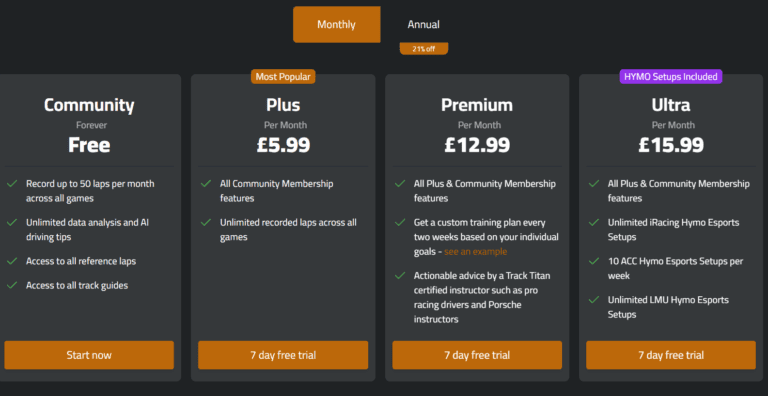
Use promo code LEWYSLINKSTT on sign up to unlock up to a 30-day free trial and 30% off your first month.
Affiliate Disclosure
As part of my partnership with Track Titan, I may earn a small commission when you use my referral link — at no extra cost to you.
I only recommend tools that I genuinely use and believe help the sim racing community improve.
If you’re curious about what Track Titan offers in general, check out my overview post [here]