Buttkicker Gamer Pro console setup is something many sim racers struggle with when using a console instead of a PC. While the Buttkicker Gamer Pro is widely used in PC racing simulators, there are far fewer guides explaining how to connect it to consoles like the PlayStation 5 or Xbox Series X.
In this guide I’ll show exactly how I installed and tested the Buttkicker Gamer Pro on my console sim racing setup, including the different connection methods I tried and the setup that worked best. If you want to feel kerbs, engine vibrations and impacts through your sim rig while racing on console, this guide will walk you through everything you need to know.
Table of Contents
ToggleWhat Is the Buttkicker Gamer Pro?
The Buttkicker Gamer Pro is a bass transducer designed to add physical vibration to your sim racing setup. Instead of producing sound like a traditional speaker, it converts low-frequency audio signals into vibrations that can be felt through your seat or sim rig.
In sim racing this means you can physically feel things like engine vibrations, kerbs, gear shifts and impacts while driving. The result is a much more immersive experience, even when racing on consoles like the PlayStation 5 or Xbox Series X, where the vibration is generated directly from the game’s audio output.
Want to take your sim racing setup to the next level? You can order the Buttkicker Gamer Pro on Amazon using the buttons below. These affiliate links help me keep testing and reviewing gear — at no extra cost to you
What Comes in the Box
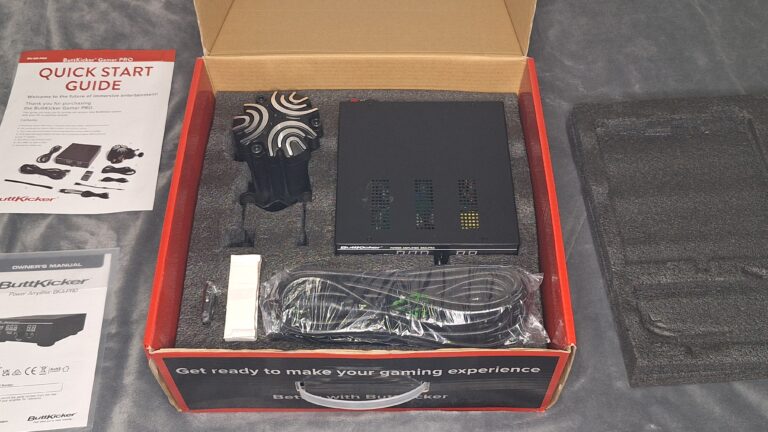
- Buttkicker transducer
- Amplifier
- Cables
- Power supply
- Remote control
- Quick start guide
- Owners manual
Mounting the Buttkicker Gamer Pro to a Sim Racing Rig
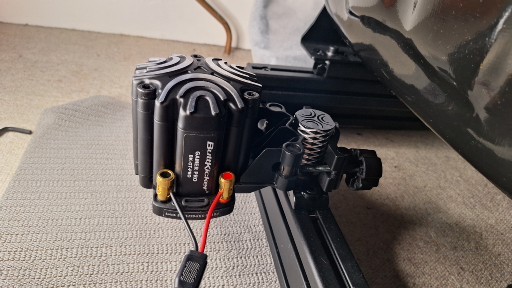
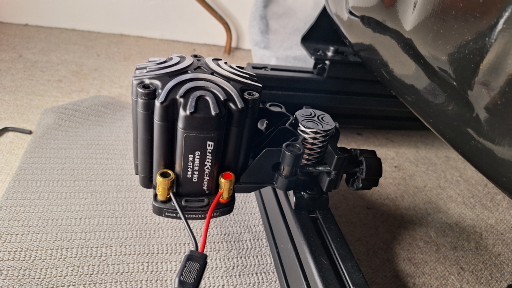
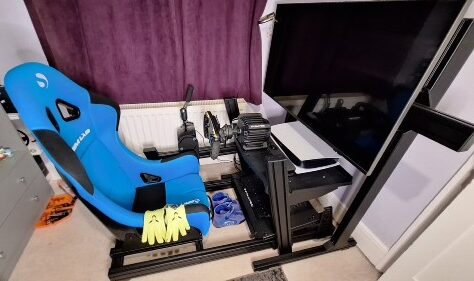
The Buttkicker Gamer Pro can be easily mounted on either a tubular or aluminum sim rig. I have mine mounted on my Sim-Lab GT1 Pro Sim Racing Cockpit, positioned low right next to the seat. For the purpose of this review, the Buttkicker is sticking out, but ideally it should be placed directly under the seat for maximum vibration.
Mounting the Buttkicker under the seat gives the strongest sensation of road bumps and kerbs, replicating how you would feel them in a real car. The vibrations travel through the rig, so adding rubber isolation feet between the rig and the floor can help enhance the effect by reducing vibration loss.
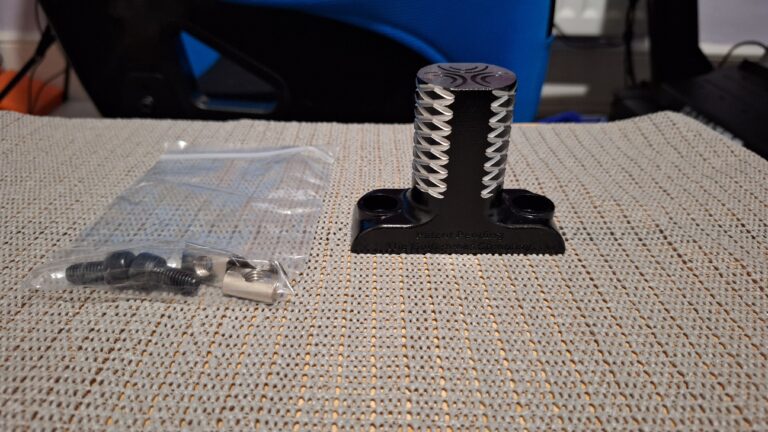
For console sim racing, mounting the Buttkicker at the rear or directly under the seat is generally the best approach. On PC setups, you can run two units: one under the pedal plate to feel ABS and understeer, and a rear unit for overall vibrations. Using telemetry through SimHub further enhances the experience.
For my console testing, I’ve tried a single unit connected via the controller audio jack as well as using an HDMI audio extractor. In the future, I also plan to experiment with sending game telemetry through SimHub, which should allow the Buttkicker to respond even more accurately to in-game events, though this setup will take some time to configure.
Can the Buttkicker Gamer Pro Work on Consoles?
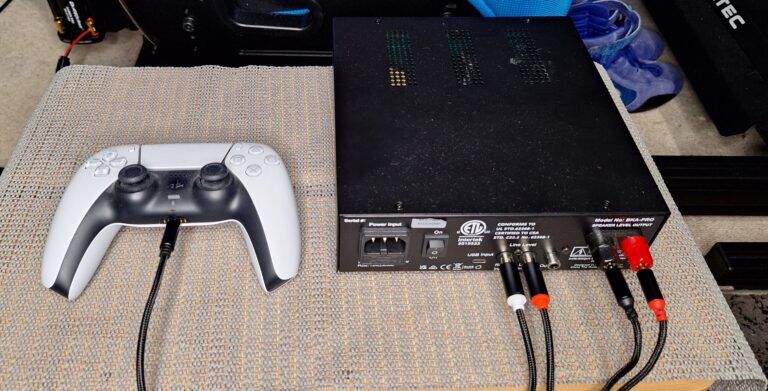
The Buttkicker Gamer Pro works by converting audio signals into physical vibrations, rather than relying on telemetry data. This makes it fully compatible with consoles like the PlayStation 5 and Xbox Series X, even without additional software.
The simplest and most reliable method for console use is connecting the amplifier to the controller’s headphone jack. This allows the Buttkicker to respond directly to the game’s audio output, giving a strong and immersive sensation of road bumps, kerbs, and other low-frequency events. In my testing with F1 25, the vibrations from kerbs and when the car bottoms out on long straights create a surprisingly realistic and immersive experience. Combined with cockpit cam views and headphones to block out background noise, this setup delivers a very convincing sense of being in the car.
It is possible to use telemetry on consoles, but this is more complicated. Telemetry would allow you to separate different vibration signals and adjust them individually, smoothing out inputs and adding precision to the feedback. On consoles, however, the vibrations are determined entirely by the game’s audio output — you cannot selectively dial out certain signals. I plan to experiment with sending game telemetry to SimHub using F1 25 and Gran Turismo 7 in the future, which should allow more control and potentially support multiple Buttkicker units.
For most console users, the controller audio jack setup remains the most straightforward method — almost plug-and-play. From my experience so far, it still provides a very immersive insight into the game, and I’ve really enjoyed using it. Even without advanced telemetry, this setup offers a convincing simulation experience that greatly enhances the feeling of driving on both PS5 and Xbox.
Best Buttkicker Gamer Pro Console Setup (Controller Audio Method)
The easiest Buttkicker Gamer Pro console setup is connecting the amplifier to the controller headphone output on the PlayStation 5 or Xbox
After testing the two main connection methods — using the controller audio jack and an HDMI audio extractor (which I couldn’t get to work reliably) — the controller audio jack method with a Y-splitter has proven to be the most straightforward and immersive setup. This method allows you to use both your headphones and the Buttkicker simultaneously, delivering strong vibration feedback without extra hardware. Here’s a step-by-step guide:
Step 1 – Mount the Buttkicker Under Your Sim Rig
Secure the Buttkicker Gamer Pro under your sim rig, ideally directly beneath your seat. This placement ensures that vibrations travel effectively through the rig, giving you the most immersive feeling of kerbs, engine rumble, and road bumps.
Step 2 – Connect the Buttkicker to the Amplifier
Use the supplied quick-release audio cables to connect the red and black ports on the Buttkicker transducer to the matching red and black ports on the amplifier. This establishes the main connection that converts audio signals into vibration.
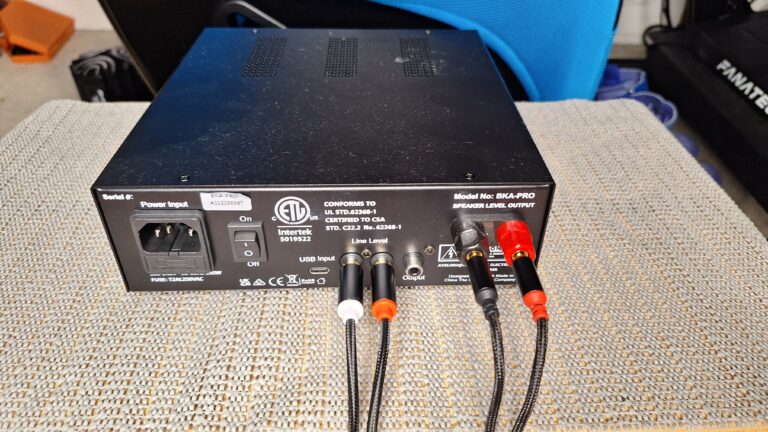
Step 3 – Connect the Controller and Headphones
Take the 3.5mm headphone jack cable and plug it into a Y-splitter. One connector goes into your controller’s headphone port, and the other goes into your headphones. This setup allows you to hear the game audio while simultaneously sending low-frequency signals to the Buttkicker.
Finally, connect the main power supply and turn on the amplifier.
Step 4 – Adjust Amplifier and Console Settings
The amplifier has two main controls:
- Volume / Vibration Strength:
Adjusts the intensity of the vibrations. Higher volume = stronger vibrations. Based on my testing, the effective range seems to be between 60 and 80, but you can fine-tune it to your preference. - High-Frequency Filter:
Reduces sharp, high-pitched vibrations, making the feedback feel smoother. I’m still fine-tuning this control, but it helps prevent the vibrations from feeling harsh.
Console Audio Settings:
To get the best experience, adjust your console’s audio slightly:
- Set audio output to stereo rather than surround or 3D to ensure the Buttkicker receives full-range low-frequency signals.
- Adjust game and system volume so headphones are comfortable, but the Buttkicker still receives strong bass.
- If available, tweak individual audio channels (engine, road, effects) to balance immersion without overpowering the vibration feedback.
Once everything is connected and settings are adjusted, your Buttkicker is ready to deliver an immersive console sim racing experience.
💡 Pro Tip: The Y-splitter method is almost plug-and-play. For most console users, it delivers the strongest, most consistent vibrations without complicated setups or additional hardware.
Want to take your sim racing setup to the next level? You can order the Buttkicker Gamer Pro on Amazon using the buttons below. These affiliate links help me keep testing and reviewing gear — at no extra cost to you
How the Buttkicker Feels in Sim Racing Games
My initial test was on F1 25, and the level of feedback from the Buttkicker Gamer Pro was very impressive. Using the game audio to feel kerbs and small bumps gave a subtle but realistic sensation through the rig.
The vibration intensity changes depending on the size of the kerb. Hitting larger kerbs at higher speeds sends strong feedback, while rolling over smaller kerbs produces a gentle, subtle rumble. It’s not linear, which makes the experience feel more like real racing.
Gear changes didn’t give much feedback with this setup, although this may be due to F1 25 itself. There is some engine vibration at higher revs, which is constant but subtle. Off-road excursions across grass produced interesting vibrations, and collisions, such as hitting a wall, result in a significant rumble that really enhances the sense of impact.
I’m looking forward to testing the Buttkicker on Gran Turismo 7 next. I’m also keen to try it with WRC, where the bumpy tracks and jumps could create very dynamic feedback — although the rougher terrain may overwhelm the sensation.
Both F1 25 and GT7 support telemetry, so I’m excited to see if I can get the Buttkicker working with SimHub for even more precise vibration feedback. I’ll post updates once I’ve tried these setups.
Console Limitations Compared to PC
While the Buttkicker Gamer Pro delivers impressive vibration feedback on consoles, there are some limitations compared to a PC setup. On consoles like the PlayStation 5 and Xbox Series X, the Buttkicker relies entirely on the game’s audio output. This means all vibrations — kerbs, engine rumble, and impacts — are combined into the stereo audio signal, with no way to selectively adjust individual elements.
On PC, however, tools like SimHub allow the use of game telemetry, sending precise data to multiple Buttkicker units. This enables features such as:
- Separating front and rear vibrations to simulate weight transfer
- Fine-tuning individual signals, like ABS, understeer, or engine feedback
- Smoothing or amplifying specific effects to enhance immersion
- For console users, this level of precision is not easily achievable. You are limited to the audio jack method, where the intensity and type of vibration are determined by the game’s audio. That said, the audio method still provides a convincing simulation experience — you can feel kerbs, bumps, impacts, and engine rumble in a way that is far more immersive than a standard gaming seat.
While consoles may not allow multiple Buttkickers or full telemetry integration yet, the simplicity of the audio jack setup makes it accessible to most players, offering a plug-and-play experience without extra software or hardware. For many console racers, this strikes a good balance between immersion and ease of use.
Final Verdict: Is the Buttkicker Gamer Pro Worth It for Console Sim Racing?
In a nutshell: yes — the Buttkicker Gamer Pro is absolutely worth it. From my initial tests on PlayStation 5, the level of immersion it provides is immediately noticeable. Feeling kerbs, bumps, and engine vibrations through your rig adds a new, deeper dimension to sim racing that simply cannot be replicated with standard vibration feedback from controllers.
Even on my first setup, I was pleasantly surprised by how realistic and engaging it felt. While I haven’t instantly become faster, I know that with further tuning, setup refinement, and practice, the Buttkicker will ultimately help improve performance. Being able to physically feel the car’s response through the rig — especially on corner entry and exit — allows for more precise throttle and braking inputs. Over time, this tactile feedback can lead to faster lap times, more consistent driving, and a better understanding of vehicle dynamics.
The Buttkicker Gamer Pro is widely regarded as the best tactile transducer on the market, and for good reason. Its ability to convert audio into nuanced vibrations gives you real-time feedback from the track that goes beyond what any standard rumble or force feedback can offer. Even subtle differences — like rolling over a small kerb versus a large one — are clearly communicated through the rig. This level of feedback is especially promising for wet-weather racing, where knowing exactly when your tyres are off the kerbs could help you time your throttle and avoid losing traction.
For console racers, the audio jack method makes installation extremely easy — almost plug-and-play. There’s no complicated setup required, and you can spend more time on track enjoying the game. Everything I’ve tested so far has been on PS5, and it works flawlessly. While I plan to continue experimenting with different settings, games, and telemetry setups, the current configuration already provides a remarkable and immersive experience.
In short, the Buttkicker Gamer Pro is not just a nice-to-have — it’s a must-have for serious sim racers, especially those looking to maximise immersion on consoles. Whether you’re racing F1, GT7, or even off-road and rally titles, the Buttkicker gives you a deeper connection to the car and the track that can make your racing both more enjoyable and more precise.
| Pros | Cons |
|---|---|
| Deep immersion through tactile feedback | Limited to audio feedback on consoles (telemetry adds precision on PC) |
| Easy plug-and-play setup for consoles | Initial cost may be high for casual players |
| Feels kerbs, bumps, engine rumble accurately | |
| Compatible with PS5 and Xbox |
Frequently Asked Questions: Buttkicker Gamer Pro for Console Sim Racing
Yes! The Buttkicker Gamer Pro works perfectly on consoles using the controller audio jack. It delivers realistic haptic feedback, letting you feel kerbs, bumps, and engine vibrations through your rig.
No. Telemetry is only needed for PC to send precise game data. On consoles, the audio jack method is plug-and-play, making installation quick and easy.
Mount the transducer under your seat for maximum vibration, connect the red and black cables to the amplifier, and use a Y-splitter to connect both your controller and headphones. Adjust amplifier and console audio settings to fine-tune the feedback.
Absolutely. Feeling kerbs, bumps, engine rumble, and impacts through your rig adds a new level of realism that standard controller vibration cannot replicate.
Potentially. While I didn’t notice instant lap-time improvements, being able to feel kerbs and car feedback can help you time throttle and braking inputs more precisely, which may improve consistency and speed over time.
Currently, consoles only support a single Buttkicker via the audio jack. PC setups using telemetry can run multiple units for front and rear feedback.
Games like F1 25, Gran Turismo 7, and other racing titles provide excellent audio signals for haptic feedback. Off-road or rally games may offer more dynamic vibrations, but care is needed to avoid overloading the transducer.
Use the amplifier’s volume knob to control intensity (higher = stronger). The high-frequency filter smooths out sharp vibrations. You can also tweak console audio settings for stereo output and adjust in-game audio levels.
Yes! It’s the best tactile transducer on the market, easy to install, and provides a deeper level of immersion. Even a single unit can transform your sim racing experience.
Conclusion
The Buttkicker Gamer Pro is a must-have for console sim racers seeking a deeper, more immersive experience. From my initial tests on PS5, I’ve been impressed by the subtle kerb vibrations, engine rumble, and the overall connection to the track that it provides.
Even with a simple audio jack setup, it delivers plug-and-play haptic feedback that enhances gameplay immediately. While PC telemetry can offer even finer control, the console method is straightforward, effective, and works with a wide range of racing games like F1 25 and GT7.
Over time, refining amplifier settings and experimenting with different setups will make the experience even more immersive and could help improve consistency and performance on track. For anyone serious about console sim racing, the Buttkicker Gamer Pro transforms the way you feel the game — making it more realistic, enjoyable, and engaging than standard controller vibration.
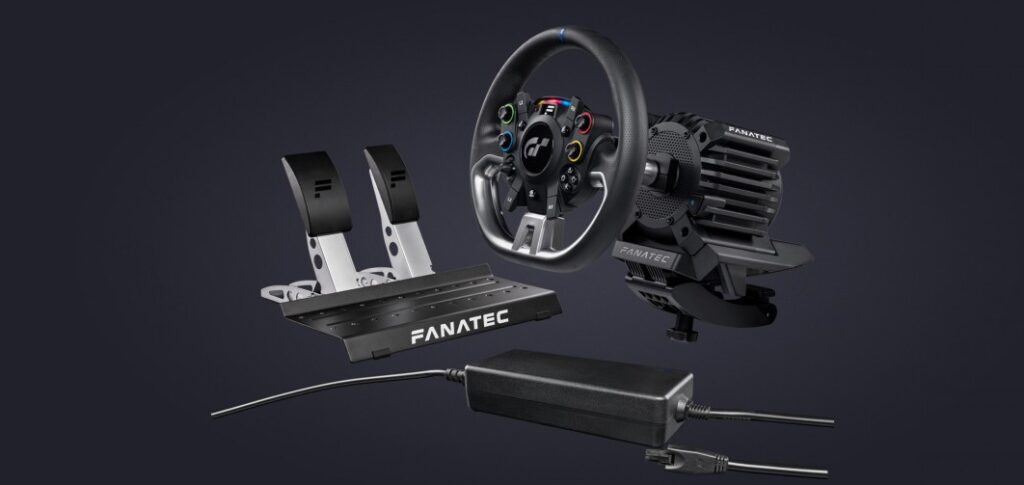
If you want to take your sim racing to the next level, the Buttkicker Gamer Pro is a tactile upgrade that simply cannot be ignored. For the ultimate immersive console sim racing experience, pairing it with a direct drive wheel like my Fanatec GT DD Pro setup takes feedback and realism to an entirely new level.
Want to take your sim racing setup to the next level? You can order the Buttkicker Gamer Pro on Amazon using the buttons below. These affiliate links help me keep testing and reviewing gear — at no extra cost to you
Disclaimer: This post contains affiliate links. I may earn a small commission if you purchase through these links at no extra cost to you.